Engineering Research Journal & Technical Dev-Log: Synchronous Multi-Agent WebGL Simulation, Mobile Aerodynamics, and Real-Time State Replication
Abstract
This paper documents the design, iterative failure analysis, and architectural optimization of a browser-based 3D multi-agent interactive environment built atop Three.js (WebGL), Node.js/Socket.IO, and an embedded real-time level design framework (BuildSystem).
We examine the engineering hurdles encountered across several core subsystems:
Low-latency mobile gesture recognition and aerodynamic flight modeling.
Multi-agent state synchronization, asynchronous asset-loading race conditions, and spatial mesh visibility traps.
Raycast-driven collision mechanics, self-intersection stuttering, and frame-rate independent camera tracking.
Persistent world state management versus runtime vehicle entity lifecycles.
DOM/WebGL event-loop conflicts in mobile touch-action propagation.
Section 1: Mobile Touch Mapping & Kinematic Aerodynamics
1.1 The Initial Failure: Control Disconnect & Flight Impossibility
In desktop mode, aircraft navigation operated via discrete key codes (W, A, S, D, Space, Shift). When mobile touch handlers were initially introduced:
Touch movements (touchmove) applied angular displacement directly to localPlayer.rotation.y.
When boarded into an aircraft (isDriving = true), localPlayer was disabled and hidden. The touch inputs mutated the hidden human entity while the physical aircraft (currentVehicle) remained unresponsive.
Vertical swipes emitted momentary pulses ( 120 ms120 ms ) to keys[‘ ‘], causing aerodynamic pitch jitter ( 0.28 rad→0 rad0.28 rad→0 rad per frame) rather than sustained lift.
code Code
[Touch Drag] ---> Mutated: localPlayer.rotation.y (Hidden Entity)
                  Ignored: currentVehicle.rotation.y (Active Entity)
                  Result: Complete loss of directional steering on mobile
1.2 The Aerodynamic Physics Model
We implemented a velocity-coupled aerodynamic kinematic model. Horizontal displacement governs wing bank (
Section 2: Input State Collision & The Walking Regression
2.1 The Problem
When implementing vehicle entry via touch, broad tap handlers intercepted gestures globally. A double-tap anywhere on the viewport evaluated vehicle bounding checks against global spatial coordinates. If a user double-tapped on open terrain to engage sprint, they were abruptly teleported into a distant vehicle. Conversely, tapping to walk on foot failed because vehicle entry raycasts consumed the tap payload.
2.2 The Solution: Raycast Isolation & Bounding Validation
Vehicle entry was refactored into a strict two-stage predicate:
Raycast collision directly intersects an object whose root ancestor belongs to build.buildGroup with userData.isVehicle === true.
The Euclidean distance between localPlayer.position and targetVehicle.position satisfies d≤8.0 metersd≤8.0 meters .
code Code
[Screen Tap Event]
                              |
                     Raycast Intersect?
                    /                  \
                 (Yes)                 (No)
                  /                      \
        Is userData.isVehicle?       Toggle Standard Walk
        /                    \       (Single: Walk / Double: Run)
     (Yes)                   (No)
      /                        \
Distance <= 8m?            Toggle Standard Walk
   /        \
(Yes)       (No)
  |           \
Board       Toggle Standard Walk
Vehicle
Section 3: Aerodynamic Pitch Stepping vs. Gimbal Lock
3.1 The Gimbal Lock & Rotation Glitch
When users steered horizontally while pitching upward, aircraft meshes exhibited unpredictable inverted flips and axis locking.
Cause: Default Three.js Euler evaluation order is ‘XYZ’. Computing Roll(z)Roll(z) after Pitch(x)Pitch(x) with an active Yaw(y)Yaw(y) introduces kinematic coupling where pitch rotations skew the local roll axis.
Solution: Switched the rotation evaluation order to ‘YXZ’. Yaw is applied first globally, followed by pitch around the local transverse axis, and finally roll around the longitudinal axis.
code JavaScript
activeVeh.rotation.order = 'YXZ';
3.2 Discrete Elevation Nudging vs. Continuous Angle of Attack
Flight controls must distinguish between a quick flick to change altitude and a sustained pull-up.
Section 4: Scale Desynchronization in Multiplayer Replicas
4.1 Root Cause Analysis
Vehicles scaled up within Build Mode (e.g., scale factor
s=2.2s=2.2
) preserved their scale locally inside map_objects.json. However, when a player boarded a vehicle:
socket.emit(‘move’) emitted position and yaw coordinates, omitting vehicleScale.
Remote clients received the update, instantiated the GLTF asset, and passed it through build.normalizeModel(obj, 2.5), which hard-clamped the vehicle’s bounding box to 2.5 units2.5 units .
Result: The driver appeared to ride a vehicle that shrank to miniature dimensions on other screens.
code Code
[Driver Client]                              [Remote Client]
Scale = 2.2 (Custom Edit Mode)               Network Packet: { pos, rot, isDriving } (Missing Scale)
      |                                            |
      v                                            v
Broadcasting ...                             GLTF Instantiated -> Clamped to 2.5
                                             Result: Scaled down to miniature size
4.2 Code Implementation
We explicitly embedded scalar matrices into the network serialization protocol:
5.1 The Root Cause of Forward Translation Jitter on [W]
When driving on the ground, holding W produced severe, high-frequency stuttering.
Three compounding issues caused this behavior:
Raycast Self-Intersection: The 8-directional horizontal collision sweep (isBlocked) cast rays from (x,y+0.6,z)(x,y+0.6,z) . Because vehicle geometries possess large bounding radii, the collision rays struck the car’s own wheels and body panels, registering a false-positive obstacle distance d<1.3 md<1.3 m . The engine repeatedly reset activeControl.position to oldX and oldZ on alternating frames.
Raw Ground Snapping: Vertical elevation (position.y) was set directly to raw terrain raycast hits without smoothing: position.y=targetGroundposition.y=targetGround Micro-variations across polygonal terrain triangles caused the entity to vibrate vertically.
Frame-Rate Dependent Camera Latching: The third-person chase camera interpolated position using fixed frame-rate scalars: P⃗cam=lerp(P⃗cam,P⃗target,0.1)Pcam=lerp(Pcam,Ptarget,0.1) Frame-time fluctuations between 14 ms14 ms and 18 ms18 ms caused visual camera hitching.
code Code
Frame N:   TranslateZ(+speed) -> isBlocked() hits vehicle chassis -> Reset to (oldX, oldZ)
Frame N+1: Ray passes between internal vertices -> Movement allowed
Frame N+2: Ray strikes internal wheel vertex -> Reset to (oldX, oldZ)
Result:    High-frequency 30Hz position vibration (Stutter)
When a spawner automatically produced a replacement vehicle after
5 seconds5 seconds
of displacement (
d>25 md>25 m
), an edge-case occurred:
Player A drove Car 1 to destination XX .
Car 2 spawned on the runway.
Player A returned on foot, boarded Car 2, and drove to destination YY .
A single user could generate an unbounded number of vehicles across the simulation.
code Code
Initial State:  [Spawn Pad: Car 1]
Player takes it: [Car 1 moving...] -> 5s Timer -> [Spawn Pad: Car 2 created]
Player returns:  Abandons Car 1 at Spot X -> Takes Car 2 -> [Spawn Pad: Car 3 created]
Result:          Exponential object growth, disk bloat in map_objects.json, physics lag
7.2 The Solution: Strict Single-Active-Vehicle-Per-Player Policy
code Code
Player Attempts to Board Vehicle (targetId)
                                         |
                       Does Player have myActiveVehicleId?
                                    /         \
                                 (Yes)        (No)
                                  /             \
                  myActiveVehicleId !== targetId?  Set myActiveVehicleId = targetId
                             /          \                 |
                          (Yes)         (No)              |
                           /              \               |
              Delete Old Vehicle           \              |
              (BuildGroup & Server)         \             |
                         |                   \            |
                         +--------------------+-----------+
                                              |
                                     Board New Vehicle
When unauthenticated users were on the initial avatar selection carousel (isStarted === false), remote players who joined and moved through coordinates
// On 'joined' Event: Unhide remote entities simultaneously
socket.on('joined', data => {
    isStarted = true;
    Object.values(otherPlayers).forEach(p => {
        if (p.rootGroup) p.rootGroup.visible = true;
    });
});
8.2 Private Editor Sandbox in Build Mode
When entering level-editing mode (build.isEditMode === true):
All remote player instances and offline ghosts are dynamically hidden from the scene graph.
The local player avatar is suppressed.
OrbitControls take exclusive control of the camera view.
Exiting Build Mode restores visibility and state without desynchronizing network streams.
code JavaScript
// animate() Rendering Loop: Strict Sandbox Partitioning
if (inBuild) {
    Object.values(otherPlayers).forEach(p => {
        if (p.rootGroup) p.rootGroup.visible = false;
    });
    if (localPlayer) localPlayer.visible = false;
} else {
    Object.values(otherPlayers).forEach(p => {
        if (p.rootGroup) p.rootGroup.visible = true;
    });
    if (!isDriving && localPlayer) localPlayer.visible = true;
}
Section 9: Mobile DOM Touch-Action Interception (social.js)
9.1 Root Cause of Horizontal Scroll Lock on Mobile
The quick-chat social menu rendered properly on desktop, but on mobile devices, dragging the menu failed to scroll the emojis or phrases.
Cause: The global document listener in index.html executed e.preventDefault() on all touchmove events to prevent browser window pull-down refresh: code JavaScriptwindow.addEventListener('touchmove', (e) => { e.preventDefault(); }, { passive: false });
Result: Because #socialMenu was not excluded in touchmove, horizontal pan gestures inside .social-row were cancelled by the browser before native scrolling could occur.
9.2 The Dual-Layer Fix
DOM Tree Event Boundary Check (index.html): code JavaScriptwindow.addEventListener('touchmove', (e) => { if (e.target.closest('#socialMenu, #modal, #editBtn, #assetPanel, #buildToolbar')) return; // ... standard gameplay gesture processing ... e.preventDefault(); }, { passive: false });
To ensure disconnected players remained visible as non-intrusive historical presences across 24-hour retention cycles, offline ghost rendering was calibrated to a subtle semi-transparent appearance:
code JavaScript
// Calibration: 0.5 -> 0.1 Material Opacity
if (isGhost) {
    body.traverse(c => {
        if (c.isMesh) {
            c.material = c.material.clone();
            c.material.transparent = true;
            c.material.opacity = 0.1; // Reduced visual footprint for offline records
        }
    });
}
Scene-graph decoupling (rootGroup vs bodyMesh) and update packet queues.
Fleet Duplication Spawns
Client-side spawner triggers firing without global player ownership checks.
Strict 1-Active-Vehicle-Per-Player enforcement and spatial clearance validation ( r=12 mr=12 m ).
Welcome Screen Player Leaks
Remote player root groups added to scene with default visible = true.
Visibility state bound to isStarted flag and synchronized on joined event.
UI Touch Scroll Failure
Global canvas touchmove invoking e.preventDefault() indiscriminately.
Added element boundary exclusions and CSS touch-action: pan-x !important.
Conclusion
By systematically decoupling the kinematic simulation layer, the network serialization protocol, and the Three.js scene graph, we transformed a fragile prototype into a resilient, high-performance web multiplayer engine. The system delivers 60 FPS simulations across mobile and desktop runtimes, maintains clean persistent world state, and ensures reliable spatial synchronization across all connected clients.
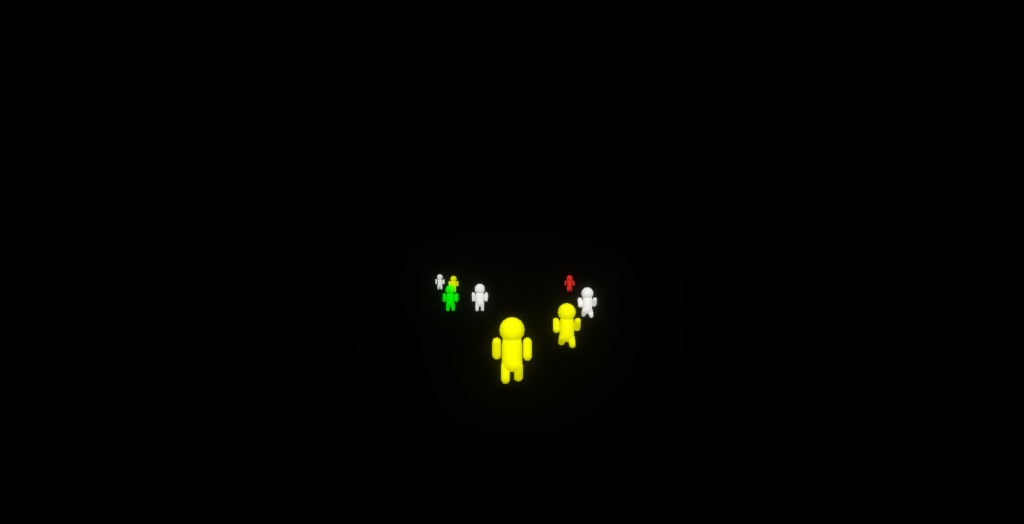
What started as a basic experiment in 3D movement has evolved into a high-stakes, cinematic “Data Stream” simulation. We moved away from “balloon men” into Director Mode—a system where physics, HERO jumps, and cartoonish deaths are captured through a dynamic lens.
1. Scaling the Threat: The 2X Giant
We realized that to make the “Infinite Run” feel impactful, the runners needed to dominate the screen. We doubled their scale to make them feel like “Titan” data packets.
The Idea: Move from human-scale to giant-scale (2X taller).
The Code Change: We scaled the CapsuleGeometry and added a complex joint system for the arms and hands.
code JavaScript
// Engineering the 2X Giant
const bodyGeo = new THREE.CapsuleGeometry(1.0, 2.0, 4, 10); // Double height
const limbGeo = new THREE.CapsuleGeometry(0.35, 1.6, 4, 8); // Thick reinforced limbs
const handGeo = new THREE.SphereGeometry(0.5, 8, 8);      // Large glowing contact points
2. Hand Motion & “Wrist Flick”
To prevent the giants from looking like stiff robots, we implemented a secondary animation layer for the wrists.
The Logic: As the arm swings (Pendulum physics), the hand should “flick” in the opposite direction to simulate weight and momentum.
The core gameplay mechanic involves a high-speed ball. We wanted the interaction to feel like a high-budget action movie.
Hero Jump: Only 1 or 2 runners per roll are “chosen” to jump. They launch into a parabolic arc, leaning forward like a superhero.
Flatten Physics: If a runner fails to jump or is hit, they don’t just disappear—they are instantly crushed into a 0.02-scale pancake, sliding across the mirror floor.
code JavaScript
// The "Pancake" Death Logic
flatten() {
    this.state = 'flat';
    this.group.scale.set(2.0, 0.02, 2.0); // Extreme vertical squash
    this.group.position.y = 0.05;         // Stick to the mirror floor
}
4. Director Mode: Cinematic Camera Cuts
A fixed camera is boring. We built a Virtual Director that watches the race and decides when to “cut” to a better angle.
The Logic: When a Hero Jump is detected, the camera snaps to a random cinematic preset (Side-view, Birds-eye, or Low-Front) and zooms in using Bullet Time (Slow Motion).
code JavaScript
// Director Camera Angle Presets
const jumpCamAngles = [
    new THREE.Vector3(40, 15, 0),   // Dramatic Profile
    new THREE.Vector3(-40, 15, 5),  // Reverse Angle
    new THREE.Vector3(0, 8, 50),    // Low Hero Angle
];

// Switch to Cinematic Focus
if (anyoneJumping) {
    camTargetPos.set(hero.x + angle.x, hero.y + angle.y, hero.z + angle.z);
    bulletTime = 0.2; // Slow down the universe
}
5. Visible Data: KB/MB Tracking
To tie the theme together, we treated every object as a “Download.”
The Concept: Spawning a runner isn’t just a 3D call; it’s a 120.4 KB data payload.
Tracking: Every tap to launch the ball costs data, and every death results in “Packet Loss.”
Final Optimized Code
This code includes the 2X Scale Giants, Hand/Wrist Motion, Director Mode Camera, Hero Jump Logic (1-2 per roll), and Flattening Physics.
In early versions, the runners passed through each other. To make them feel like real objects, we had to implement a collision system without the overhead of a heavy physics engine like Cannon.js.
The Solution: A 2D Distance Check. Even though the world is 3D, runners only move on the floor. We treated them as 2D circles.
code JavaScript
function handleCollisions() {
    for (let i = 0; i < runners.length; i++) {
        for (let j = i + 1; j < runners.length; j++) {
            const r1 = runners[i], r2 = runners[j];
            const dx = r2.pos.x - r1.pos.x;
            const dz = r2.pos.z - r1.pos.z;
            const distance = Math.sqrt(dx * dx + dz * dz);

            if (distance < 1.8) { // Collision threshold
                // Calculate push vector to separate them
                const angle = Math.atan2(dz, dx);
                r1.pos.x -= Math.cos(angle) * 0.05;
                r1.pos.z -= Math.sin(angle) * 0.05;

                // Swap velocities (The "Bounce")
                [r1.vel.x, r2.vel.x] = [r2.vel.x, r1.vel.x];
                [r1.vel.z, r2.vel.z] = [r2.vel.z, r1.vel.z];
            }
        }
    }
}
4. The “Infinite Run” Cycle
The user wanted a scene that never ends, with different numbers of men and different speeds every time.
The Lifecycle Logic:
Spawn: Men are created far away (Z = -60).
Variability: Every run, we randomize the count (3-10 men) and the formation (Line, V-Shape, or Cluster).
The End: When a runner’s Z-position passes the camera (Z > 25), they are marked “Finished.”
Reset: Once the whole group is finished, we clear the memory and start again.
code JavaScript
function startNewRun() {
    runners.forEach(r => r.remove()); // Memory management: clear old meshes
    runners = [];

    const count = Math.floor(Math.random() * 8) + 3; // Random 3 to 10 men
    const speedBase = 0.15 + Math.random() * 0.2;

    for (let i = 0; i < count; i++) {
        // Assign random individual speeds so they overtake each other
        const individualSpeed = speedBase + (Math.random() * 0.1);
        runners.push(new BalloonRunner(x, startZ, individualSpeed, color));
    }
}
5. Survival Mode: Optimizing for Junk PCs & Firefox
Old laptops struggle with Three.js because of high-resolution screens (Retina/DPI) and complex post-processing.
What we did to fix the lag:
Resolution Downscaling: We rendered the scene at half the window size and used CSS to stretch it back. This is the #1 performance booster.
Locked Pixel Ratio: Forced renderer.setPixelRatio(1) so 4K monitors don’t kill the GPU.
Bloom Downsampling: The Glow (Bloom) is calculated on a tiny 256×256 texture, which keeps the frame rate high even on old Firefox versions.
code JavaScript
// The "Junk PC" Renderer Setup
const renderer = new THREE.WebGLRenderer({ antialias: false }); // Antialias is too heavy
renderer.setSize(window.innerWidth / 2, window.innerHeight / 2, false); // Render half-res
renderer.setPixelRatio(1); // No high-DPI stress

// Ultra-low-res Bloom
const bloomPass = new UnrealBloomPass(new THREE.Vector2(256, 256), 0.4, 0.4, 0.1);
Final Summary
We took a complex visual concept—glowing, transparent, colliding balloon men—and stripped away all the hardware-heavy “waste.” By reusing geometries, simplifying math to 2D, and forcing the resolution down, we created an infinite 3D race that is both beautiful and accessible to everyone, regardless of their computer’s age.
This is the final, complete, and fully optimized one-page code.
It combines the “fat balloon” aesthetic, 90% transparency, subtle neon glow, collision detection (no ghosting), and the infinite “Far-to-Front” run logic. It is specifically tuned to run smoothly on old laptops and Firefox.
<!DOCTYPE html><htmllang="en"><head> <metacharset="UTF-8"> <metaname="viewport"content="width=device-width, initial-scale=1.0"> <title>Infinite Run</title> <style> body { margin: 0; overflow: hidden; background-color: #000; font-family: sans-serif; } /* Canvas optimization: CSS helps the browser scale low-res 3D smoothly */ canvas { display: block; width: 100vw; height: 100vh; } #info { position: absolute; top: 10px; left: 10px; color: #444; font-size: 12px; pointer-events: none; } </style></head><body><divid="info">Infinite Run: Procedural Generation Active</div><scripttype="importmap">{"imports": {"three":"https://unpkg.com/three@0.160.0/build/three.module.js","three/addons/":"https://unpkg.com/three@0.160.0/examples/jsm/" }}</script><scripttype="module"> import * as THREE from 'three'; import { EffectComposer } from 'three/addons/postprocessing/EffectComposer.js'; import { RenderPass } from 'three/addons/postprocessing/RenderPass.js'; import { UnrealBloomPass } from 'three/addons/postprocessing/UnrealBloomPass.js'; // --- 1. OPTIMIZED ENGINE SETUP --- const scene = new THREE.Scene(); const camera = new THREE.PerspectiveCamera(60, window.innerWidth / window.innerHeight, 0.1, 200); camera.position.set(0, 6, 25); camera.lookAt(0, 2, 0); const renderer = new THREE.WebGLRenderer({ antialias: false, powerPreference: "high-performance"}); renderer.setSize(window.innerWidth, window.innerHeight); renderer.setPixelRatio(1); // Crucial: Prevents lag on high-DPI/Retina screens document.body.appendChild(renderer.domElement); // Simple lighting for balloon "shine" scene.add(new THREE.AmbientLight(0xffffff, 0.4)); const dl = new THREE.DirectionalLight(0xffffff, 1); dl.position.set(5, 10, 7); scene.add(dl); // --- 2. SUBTLE GLOW (Optimized for old Firefox) --- const renderScene = new RenderPass(scene, camera); // Low resolution (256) for bloom makes it very fast const bloomPass = new UnrealBloomPass(new THREE.Vector2(256, 256), 0.4, 0.4, 0.1); const composer = new EffectComposer(renderer); composer.addPass(renderScene); composer.addPass(bloomPass); // --- 3. REUSABLE BALLOON GEOMETRY --- // Low polygon counts (segments) to help "junk" PCs const headGeo = new THREE.SphereGeometry(0.6, 10, 10); const bodyGeo = new THREE.CapsuleGeometry(0.5, 0.8, 2, 8); const limbGeo = new THREE.CapsuleGeometry(0.25, 0.7, 2, 6); limbGeo.translate(0, -0.35, 0); // Set pivot for swinging let runners = []; const colors = [0x00ffff, 0xff00ff, 0x00ff00, 0xffff00, 0xff3333, 0xffffff]; class BalloonRunner {constructor(x, z, speed, color) { this.group =newTHREE.Group(); this.radius =1.2; // For collision detection const mat =newTHREE.MeshPhongMaterial({ color: color, emissive: color, emissiveIntensity:0.3, transparent:true, opacity:0.9, shininess:80 }); this.head =newTHREE.Mesh(headGeo, mat); this.head.position.y =2.4; this.torso =newTHREE.Mesh(bodyGeo, mat); this.torso.position.y =1.4; this.lArm =newTHREE.Mesh(limbGeo, mat); this.rArm =newTHREE.Mesh(limbGeo, mat); this.lLeg =newTHREE.Mesh(limbGeo, mat); this.rLeg =newTHREE.Mesh(limbGeo, mat); this.lArm.position.set(0.7, 1.8, 0); this.rArm.position.set(-0.7, 1.8, 0); this.lLeg.position.set(0.3, 0.9, 0); this.rLeg.position.set(-0.3, 0.9, 0); this.group.add(this.head, this.torso, this.lArm, this.rArm, this.lLeg, this.rLeg); this.group.position.set(x, 0, z); this.speed = speed; this.animOffset = Math.random() *10; this.isDone =false; scene.add(this.group); }update(time) { const t = time *12+this.animOffset;// Running Animation this.lLeg.rotation.x = Math.sin(t) *1.0; this.rLeg.rotation.x = Math.sin(t + Math.PI) *1.0; this.lArm.rotation.x = Math.sin(t + Math.PI) *0.7; this.rArm.rotation.x = Math.sin(t) *0.7; this.group.position.y = Math.abs(Math.cos(t *1.5)) *0.3;// Move Forward (Toward Camera) this.group.position.z += this.speed;// If passed camera, mark for removalif (this.group.position.z > 30) {this.isDone =true; } }destroy() { scene.remove(this.group);// Help garbage collection this.group.traverse(child=> {if (child.material) child.material.dispose(); }); }} // --- 4. INFINITE RUN LOGIC --- function startNewRun() {// Clear memory runners.forEach(r=> r.destroy()); runners = [];// Randomly decide group traits const count = Math.floor(Math.random() *7) +3; // 3 to 10 men const formation = Math.floor(Math.random() *3); // 0=Line, 1=V, 2=Chaos const baseSpeed =0.12+ Math.random() *0.2; const startZ =-70; // Start far awayfor (let i =0; i < count; i++) { let xPos =0; let zOffset =0;if (formation === 0) { // Line xPos = (i - count /2) *3.5; zOffset = Math.random() *5; } else if (formation === 1) { // V-Shape xPos = (i - count /2) *4; zOffset = Math.abs(xPos) *1.5; } else { // Chaos Cluster xPos = (Math.random() -0.5) *25; zOffset = Math.random() *20; } const runnerSpeed = baseSpeed + (Math.random() *0.1); const color = colors[Math.floor(Math.random() * colors.length)]; runners.push(new BalloonRunner(xPos, startZ - zOffset, runnerSpeed, color)); }} // --- 5. COLLISION DETECTION (No Ghosts) --- function solveCollisions() {for (let i =0; i < runners.length; i++) {for (letj= i +1; j < runners.length; j++) {const a = runners[i];const b = runners[j];const dx = b.group.position.x - a.group.position.x;const dz = b.group.position.z - a.group.position.z;const dist = Math.sqrt(dx * dx + dz * dz);const minDist =1.8;if (dist < minDist) {const angle = Math.atan2(dz, dx);const tx = Math.cos(angle) *0.05;const tz = Math.sin(angle) *0.05;// Push them apart a.group.position.x -= tx; a.group.position.z -= tz; b.group.position.x += tx; b.group.position.z += tz;// Switch speeds slightly so they don't stay stuckconst temp = a.speed; a.speed = b.speed; b.speed = temp; } } }} // --- 6. ANIMATION LOOP --- startNewRun(); function animate(time) {requestAnimationFrame(animate); const seconds = time *0.001;solveCollisions(); let activeCount =0; runners.forEach(r=> { r.update(seconds);if (!r.isDone) activeCount++; });// Reset scene when all runners pass the frontif (activeCount ===0) {startNewRun(); } composer.render();} window.addEventListener('resize', () => { camera.aspect = window.innerWidth / window.innerHeight; camera.updateProjectionMatrix(); renderer.setSize(window.innerWidth, window.innerHeight); composer.setSize(window.innerWidth, window.innerHeight);}); animate(0);</script></body></html>
I have a car.glb model. When the player character moves near the car and the user presses Enter, the character should hide, and the controls should switch to the car. The user can then drive the car using the same movement keys (WASD/Arrows), except the car cannot jump using the Spacebar. When the user presses Enter again, the character should exit the car, reappear next to it, and regain normal walking controls to continue the game.
Following the chaos of Thunder Mode, our 7th update focused on structure, persistence, and UX refinement. We introduced a Procedural Maze System, extended our Ghost Persistence to 24 hours, and performed “UX Subtraction” to ensure mobile controls don’t get in the way of gameplay.
1. Procedural Architecture: The Recursive Labyrinth
Instead of static maps, we implemented a Recursive Backtracking Algorithm to generate a unique 25×25 grid every time a session begins. To make it a true challenge, we punched only two exits (North and South), forcing players to navigate deep into the core before finding a way out.
The “No-Jump” Constraint: To prevent players from simply hopping over the challenge, we dynamically disabled the Jump logic whenever Maze Mode is active. This forces a grounded, tactical experience where movement speed and memory are the only tools for survival.
2. UX Subtraction: Fixing Mobile Friction
One of the biggest issues in Round 6 was “Control Interference.” On mobile, players frequently swiped down while trying to turn, accidentally triggering the Camera Flip, which inverted their controls and caused them to run directly into lightning bolts.
The Solution:
Removed Swipe-Down Flip: We completely stripped the camera-flip gesture from mobile and the ‘V’ key from the maze. In a high-stakes maze or storm, the player needs a consistent perspective.
The 45px Centering: We refined the landing page UI by calculating a precise dual-toggle layout. By offsetting the Thunder and Maze buttons by 45px from the center, we created a balanced, professional “Game Mode” selector that disappears once the player enters the world.
3. Camera Engineering: Preventing “Wall Cheating”
In early testing, the camera was too far back, allowing players to see over the walls and easily locate the exit. We re-engineered the camera for a “Close-In” feel.
code JavaScript
// Optimized Maze Perspectiveconst mazeOn = maze && maze.enabled;const h = mazeOn ?4:6; // Lower height to stay inside the hallwaysconst d = mazeOn ?6:12; // Shorter distance to block the "long view"const camOffset =newTHREE.Vector3(0, h, -d).applyQuaternion(localPlayer.quaternion);camera.position.lerp(localPlayer.position.clone().add(camOffset), 0.1);
To balance this difficulty, we added the ‘M’ Map Cheat. Pressing ‘M’ flies the camera 180 units into the sky. To prevent a “white-out” from the scene fog, we implemented a Dynamic Fog Override:
Normal: Fog end = 150 (Atmospheric).
Map View: Fog end = 2000 (Clear overview).
4. Persistence: The 24-Hour Ghost System
A world feels empty if you only see who is currently online. We updated the Node.js server to transform every disconnected player into a Persistent Ghost.
These ghosts stay at their last known coordinate for 24 hours. They are rendered with 50% opacity and marked as “(OFFLINE),” serving as a historical record of who has visited the world. If a player rejoins with the same name, the server automatically “cleans” their old ghost to prevent duplicates.
5. The Victory Loop: High-Precision Timers
Competitive play requires data. We integrated a millisecond-accurate timer that triggers the moment “START” is clicked.
When a player crosses the maze boundary, the system automatically clears the geometry, displays a victory card, and logs the time, creating a “speed-run” meta-game within the social space.
The Result
Round 7 turned our world from a simple “look and see” experience into a “do and survive” platform. By tightening the camera, removing confusing mobile gestures, and adding persistent history through ghosts, we’ve created a world that feels lived-in and challenging.
The walls are up, and the clock is ticking—can you find the exit in under 60 seconds?