# 1. Rename all files to replace spaces with underscores and lowercase them
for f in *' '*.fbx *' '*.fbm; do
    [ -e "$f" ] || continue
    new_name=$(echo "$f" | tr '[:upper:]' '[:lower:]' | tr ' ' '_')
    mv "$f" "$new_name"
done

# 2. Convert all raw .fbx files to .glb
for f in *.fbx; do
    [ -e "$f" ] || continue
    base="${f%.fbx}"
    fbx2gltf -i "$f" -b -o "${base}.glb"
done

# 3. Compress and optimize all .glb files using your pipeline
for f in *.glb; do
   [[ "$f" == *"_clean.glb" ]] && continue
   [ -e "$f" ] || continue

   base="${f%.glb}"
   echo "Optimizing $f to high-quality ${base}_clean.glb..."

   gltf-transform resize "$f" "${base}_clean.glb" --width 512 --height 512 && \
   gltf-transform prune "${base}_clean.glb" "${base}_clean.glb" && \
   gltf-transform webp "${base}_clean.glb" "${base}_clean.glb" --slots baseColor && \
   gltf-transform draco "${base}_clean.glb" "${base}_clean.glb" --quantize-position 11 --quantize-texcoord 12
done


# 2. Re-run your compression pipeline
for f in *.glb; do
   [[ "$f" == *"_clean.glb" ]] && continue
   [ -e "$f" ] || continue

   base="${f%.glb}"
   echo "Optimizing $f to high-quality ${base}_clean.glb..."

   gltf-transform resize "$f" "${base}_clean.glb" --width 512 --height 512 && \
   gltf-transform prune "${base}_clean.glb" "${base}_clean.glb" && \
   gltf-transform webp "${base}_clean.glb" "${base}_clean.glb" --slots baseColor && \
   gltf-transform draco "${base}_clean.glb" "${base}_clean.glb" --quantize-position 11 --quantize-texcoord 12
done


# 3. delete all beside _clean.glb

shopt -s extglob && rm -rf !(*_clean.glb)
Category: gltf-transform
-
.fbx – .glb – compression
-
gltf-transform –width 256 –height 256
batch
for f in *.fbx; do base="${f%.fbx}" # 1. Convert FBX to a temporary GLB fbx2gltf -i "$f" -o "${base}_raw.glb" # 2. Complete optimization pipeline: Resize textures, clear empty animations, apply Draco gltf-transform resize "${base}_raw.glb" "${base}.glb" --width 512 --height 512 && \ gltf-transform draco "${base}.glb" "${base}.glb" --quantizePosition 10 --quantizeTexcoord 10 # 3. Clean up the large intermediate file rm "${base}_raw.glb" doneThis updated command downscales all textures to 256×256 pixels and combines geometry quantization with animation thinning. This pipeline will maximize your file savings, likely bringing your 25 MB models down to under 1.5 MB each.
Run this loop in your Debian terminal:
bash
for f in *.fbx; do base="${f%.fbx}" # 1. Convert FBX to a raw GLB fbx2gltf -i "$f" -o "${base}_raw.glb" # 2. Resize textures to 256x256, prune empty elements, and aggressively compress geometry gltf-transform resize "${base}_raw.glb" "${base}.glb" --width 256 --height 256 && \ gltf-transform prune "${base}.glb" "${base}.glb" && \ gltf-transform draco "${base}.glb" "${base}.glb" --quantizePosition 10 --quantizeTexcoord 10 --quantizeNormal 8 # 3. Remove the heavy source file rm "${base}_raw.glb" doneUse code with caution.
What makes this code compress so aggressively?
resize --width 256 --height 256: Shrinks texture memory overhead by up to 98% compared to standard Mixamo 2K textures.prune: This automatically detects and removes unused nodes, empty animations (like that deadTake 001track in your log), and duplicate materials.--quantizeNormal 8: Adds normal vector quantization to the Draco step, stripping extra floating-point precision data from the model’s lighting data where the human eye won’t notice it.
Let me know what your final file sizes look like after running this loop! If they are still too large, we can add animation sampling reduction to strip out heavy keyframes, or switch the texture format to KTX2. Would you like to check the final sizes first?
-
gltf-transform : FBX Draco-compress glb
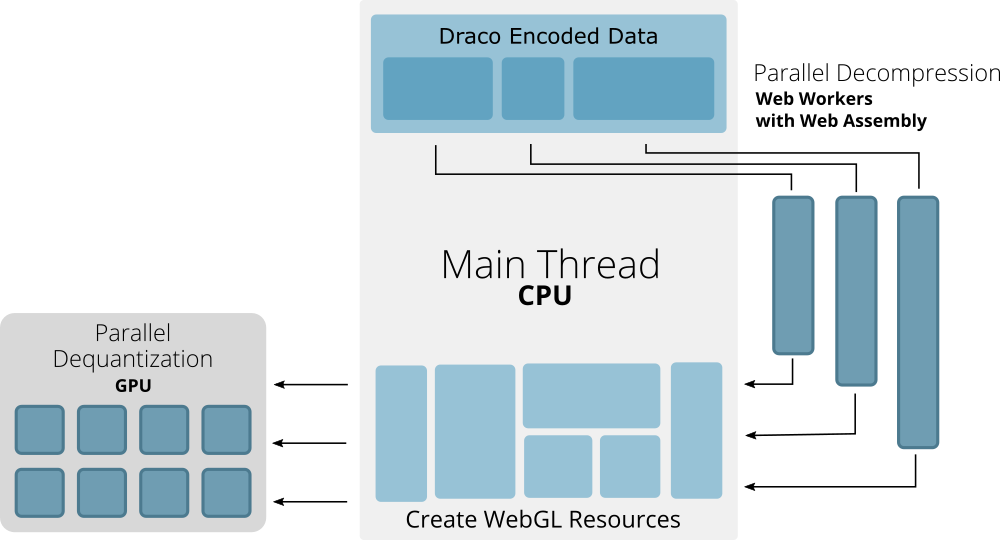
https://cesium.com/blog/2018/04/09/draco-compression To compress
run_output.glb(and your other generated GLB files), you can apply Draco mesh compression and animation resampling directly from your Debian terminal.Step 1: Compress the File You Just Created
Run
@gltf-transform/clidirectly onrun_output.glb:Bash
gltf-transform draco run_output.glb run_compressed.glbTo verify the file size reduction, check the before and after sizes:
Bash
ls -lh run_output.glb run_compressed.glbStep 2: Compress Animation Keyframes (Optional)
Draco compresses 3D geometry (vertices, normals, UVs), but Mixamo animations often contain thousands of redundant keyframe tracks. To compress the animation keyframe data as well, run
resample:Bash
gltf-transform resample run_compressed.glb run_final.glbStep 3: Compress All FBX Files in Your Folder at Once
To convert and Draco-compress every
.fbxfile in yourbattledirectory in a single loop, run:Bash
for f in *.fbx; do
  fbx2gltf -i "$f" -o "${f%.fbx}.glb"
  gltf-transform draco "${f%.fbx}.glb" "${f%.fbx}_compressed.glb"
  rm "${f%.fbx}.glb"
done
This will produce optimized
_compressed.glbversions of all your animations.